
Checkout Forms: A smarter way to collect attendee information
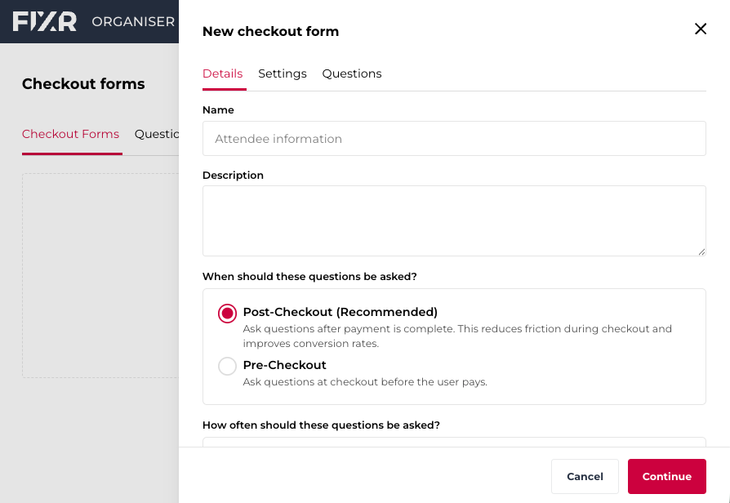
We’ve just launched a major upgrade to how you collect information from your attendees.
Our previous ‘Additional Questions’ feature has been completely rebuilt into Checkout Forms – a more powerful, flexible way to gather the data you need, exactly when you need it.
Whether you're managing dietary requirements, taking food pre-orders, collecting merchandise sizes and preferences, understanding accessibility needs, or running more complex event logistics, Checkout Forms give you far greater control over the entire process.
What’s new
This significant upgrade to the previous feature means you can more easily collect the right information at the right time.
You can now choose when questions are asked:
- Before checkout (during purchase)
- After checkout (via follow-up questionnaire)
This means you can prioritise critical information up front while leaving less urgent details for later, without disrupting the purchase flow.
Even better, tickets are reserved before pre-checkout questions are answered, so customers won’t miss out while completing forms.
You’re also no longer limited to asking questions once per booking.
With Checkout Forms, you can ask:
- Per order (once per transaction), or
- Per ticket (for every attendee)
This is especially useful for guest-specific details, table bookings where each attendee needs to provide information, or events with personalised experiences.
Group questions into structured forms
Instead of adding individual questions one by one, you can now create forms that group related questions together.
For example:
- A 'VIP Experience' form with exclusive questions
- A 'Catering Preferences' form for menu selections
- An 'Accessibility Requirements' form
These forms can then be applied to specific ticket types, giving you much more control over who sees what.
Handle limited options with built-in stock controls
Running out of meal choices? Limited merch? Capacity constraints?
You can now set stock limits on answer options (e.g. '10 vegetarian meals available', 'Free t-shirt with first 30 orders'). Once an option is full, it automatically shows as sold out.
This removes the need for manual tracking and avoids over-allocation.
Give attendees flexibility
If you allow them to, attendees can update their answers after purchase, and receive reminders if they haven’t completed required questions
You control which questions are required or optional, deadlines for responses, and when reminders are sent.
This is ideal for events where information is needed ahead of time (e.g. catering deadlines, stock ordering).
Get better data, exactly where you need it
We’ve improved how your data is structured and exported:
- Per-ticket answers → available in the Attendee CSV
- Order-level answers → available in the Order CSV
This avoids duplication and makes reporting cleaner and more reliable.
You’ll also see new summary views for certain question types (like stock-limited options) on the event dashboard, helping you quickly understand responses and stock levels at a glance.
Gain more flexibility and customisation
Checkout Forms are designed to handle much more complex use cases than before, including:
- Food and drink pre-orders
- Merchandise sizing and allocation
- Accessibility and support requirements
- Multi-day or multi-session preferences
- Table management
- VIP or tier-specific experiences
This is a fundamental improvement in how you can manage attendee data, allowing you to collect more accurate, structured information, reduce manual follow-up and administration, avoid overselling limited options, and improve the attendee experience
What you need to know
- Checkout Forms will replace the existing Additional Questions feature
- Existing events using the previous Additional Questions will stay as they are; any new or duplicated events from now on will use the new Checkout Forms
- The feature will appear as a new Checkout Forms section within your event
We recommend reviewing your forms and questions ahead of your next event to take full advantage of the new capabilities.
For more information, head to the Checkout Forms section of our Help Centre.
Author
